Skip to content
Book a demoStart free

Staffing requirements

Know who you need. Before you fill the schedule.

Set how many people the work needs, when, and with which skills, for every role, activity and workstream on a board. Then see where the schedule falls short, interval by interval.

Coming soon. Until then, set needs per shift, or per activity from Grow.

One view

A headcount is a start. The work gives it meaning.

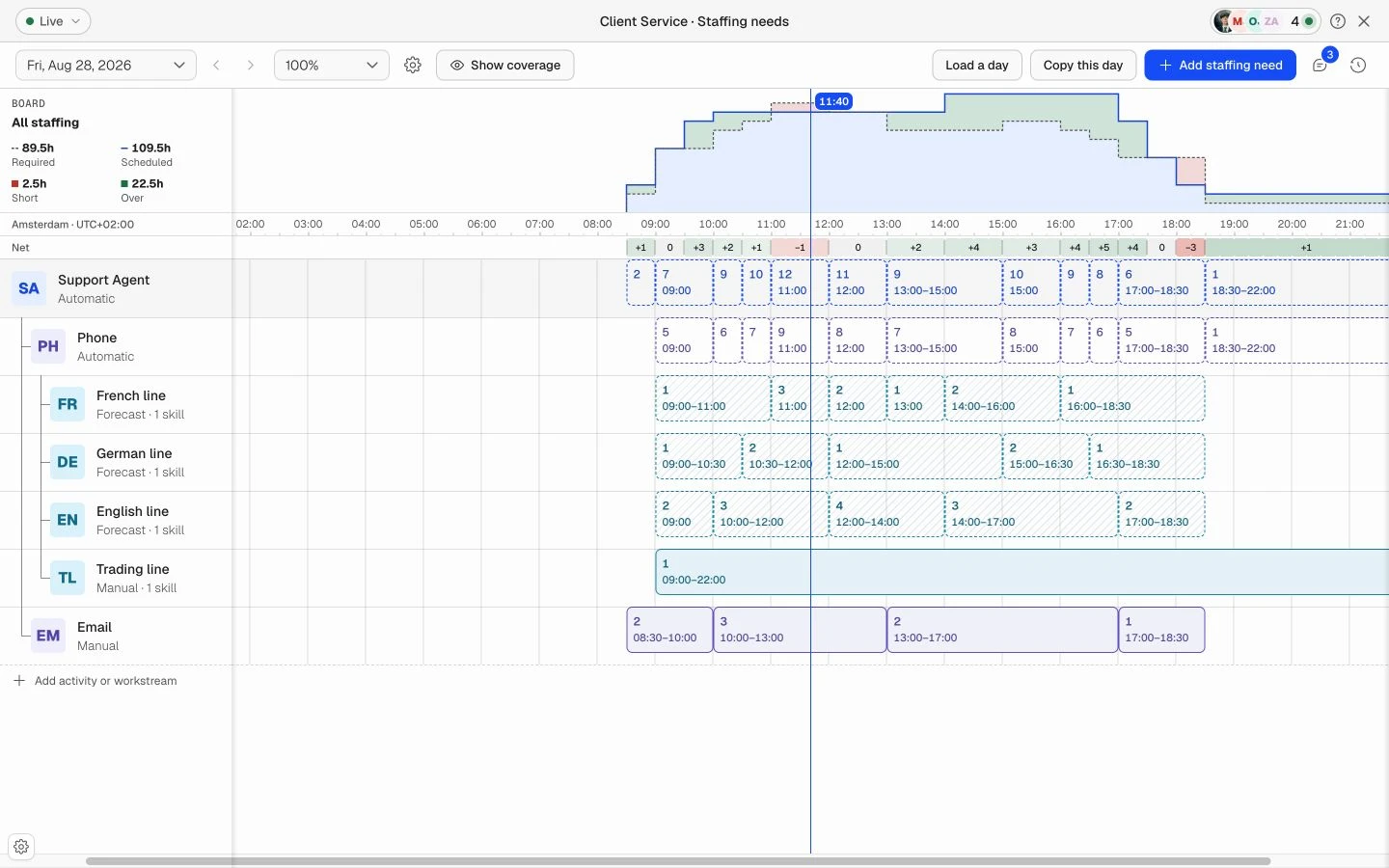
Set the need for a role, an activity or a workstream. Keep it simple for a fixed post, or split it when queues, languages or services need their own cover.

Staffing requirements timeline with a Support Agent role, Phone and Email activities, and language workstreams with different staffing needs through the day.
  • Roles

    Who you need on the board.

  • Activities

    The work they cover through the day.

  • Workstreams

    Demand within that work, such as a queue or a language.

Staffing requirements

Start with the work. Give the schedule a clear target.

01Plan through the dayComing soon

Six at nine. Nine at eleven. Four before closing.

Draw staffing needs on the timeline or enter the values for each time range. Adjust the busy part of the day without changing every other interval.

  • Work in 15, 30 or 60-minute intervals
  • Use manual needs or staffing targets from a forecast
  • Copy saved manual requirements to other dates

02Define qualified coverage

The right number of people needs the right skills.

A full team can still be missing the person who can cover a particular queue or responsibility. Add required skills and minimum levels to make that distinction clear.

  • Set qualifications alongside the staffing need
  • Use minimum levels where the work requires them
  • Skills qualify the people; they do not add extra headcount
03Review the gap

See where the schedule meets the need. And where it does not.

Compare Required and Scheduled across the day. Read the net gap, then inspect the role, activity or workstream that needs attention before adjusting the schedule.

  • Read Short, On target and Over states alongside the chart
  • Inspect a specific interval instead of relying on a daily total
  • Use the requirement as the target for shift and day planning
Staffing requirements

What's included.

Every plan starts with a free trial, 30 days on every plan, no credit card.

  • Needs per shift

    Every plan

    A minimum and maximum per role on every shift.

  • Needs per activity

    Grow and up

    People needed for each activity, in 15-minute blocks.

  • Forecast targets

    Scale

    A forecast from your history sets the need, down to 15 minutes.

  • Skills and certificates

    Every plan

    Levels and certificates that show who can cover which work.

  • Staffing needs view

    Coming soon

    Every need for a board in one view: roles, activities, workstreams and skills.

  • Needs through the day

    Coming soon

    Draw the need on a timeline, in 15, 30 or 60-minute intervals.

  • Coverage by interval

    Coming soon

    Required against scheduled for every interval: short, on target or over.

  • Copy a saved day

    Coming soon

    Copy the needs you set to other dates, then change what differs.

Compare plans
FAQ

Questions about staffing requirements.

Staffing requirements describe how many people the work needs, when they are needed and which qualifications matter. The schedule assigns people to shifts and activities; the requirements give that schedule a target.

Yes. Every plan sets a minimum and maximum per role on each shift. From Grow you set how many people each activity needs, in 15-minute blocks, and on Scale a forecast fills those needs from your own history. The staffing requirements view, which brings roles, activities, workstreams and skills together for a board, is coming soon.

A role describes who must be present, an activity describes the work to cover, and a workstream separates demand within that work, such as a queue, language or service. You can start with a role or a standalone activity and add detail where it helps planning.

Required skills and minimum levels define which people qualify for a requirement. They do not create additional demand. Needing three people with a particular qualification is still a requirement for three people.

No. Forecasting, on Scale, turns your demand history into a staffing target. Staffing requirements show that target next to the needs you set by hand, so you can adjust it against the schedule.

No. Requirements set the target. People are assigned on the schedule, by you or by the solvers, which plan to these numbers.

Next week, sorted.

Start free and build your first schedule today. No credit card needed.

Book a demo

Necessary Always on

Keeps the site secure, supports features you request and remembers your privacy choices.